

This guide walks you through the two quick methods to log in to your email using Roundcube Webmail.
Method 1: Direct Webmail Access
Use this method if you want to quickly check your email without logging into your web hosting control panel.
-
Navigate to the Webmail URL: This requires your domain name. Open your browser and visit: https://yourdomain.com/webmail
Note: Replace yourdomain.com with your actual domain name - Log In to Your Account: Enter your full email address (e.g., user@yourdomain.com) and password, then click Login.
- Access Inbox: You will automatically be redirected and logged into webmail.
Method 2: Access via DirectAdmin Control Panel
Use this method if you are already logged into your hosting control panel or need to access a specific email account directly from your control panel
- Log in to DirectAdmin: Open your browser and go to your control panel URL:[http://yourdomain.com:2222]
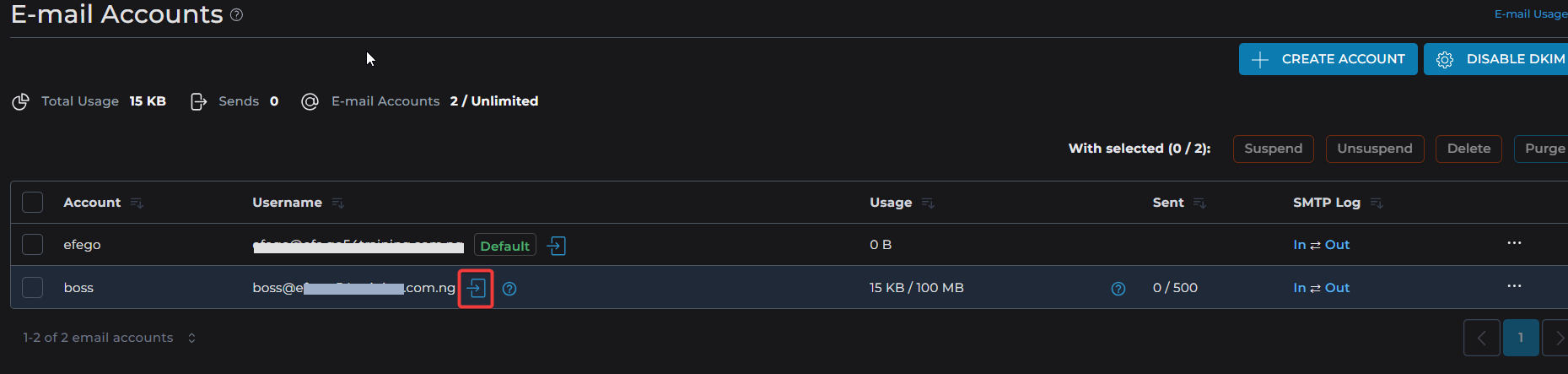
Note: Replace yourdomain.com with your actual domain name - Navigate to Email Accounts: In the main menu, look for the Email Manager section and select Email Accounts.
- Open Webmail: Locate the email address you wish to check. Click the [-->] link or the envelope icon next to that account to open the email automatically.